Schoolwatch

Why Schools Should Still Invest in Vape Detectors

Why Schools Should Still Invest in Vape Detectors

The government’s new ban on disposable vapes and flavoured options may seem like a turning point in the battle against teen vaping – and it is. But while the intention behind the legislation is commendable, it would be short-sighted for schools to assume the problem ends here. In reality, access to vapes among under-18s remains a very real issue – and the need for preventative measures, such as vape detectors, has never been greater.

The Ban: What Has Changed?

The new law bans the sale of single-use vapes and introduces stricter regulations around flavours and packaging that appeal to children. Retailers can no longer legally sell these products to young people, and enforcement will be stepped up. This is undeniably a positive move – but it does not mean that vapes have disappeared from school grounds.

Young People Weren’t Buying from Shops Anyway

Let’s be honest: the majority of pupils caught vaping in schools weren’t walking into high street shops and purchasing them legally. They were getting them from older friends, siblings, online sellers, or black-market sources. The ban may increase the cost and reduce availability somewhat, but it’s unlikely to sever supply lines completely.

In fact, as legal availability decreases, illegal trading may rise – and that comes with greater risks. Unregulated products are more likely to contain harmful substances or dangerously high levels of nicotine, putting children’s health at even greater risk.

Vaping on School Premises: Still a Safeguarding Concern:

Even with the ban in place, the responsibility for enforcing a vape-free environment still falls heavily on schools. Vaping in toilets, changing rooms or secluded corridors continues to be a daily reality for many school leaders and safeguarding teams.

Left unchecked, vaping doesn’t just present health concerns. It disrupts learning, damages school culture, and can escalate into wider behavioural issues. The presence of vape detectors gives schools a clear way to monitor and deter this behaviour consistently and discreetly.

A Ban Is Not a Silver Bullet

Public policy is an important part of change, but schools are on the frontline. The same was true with smoking. Banning cigarettes didn’t stop pupils bringing them into school – it required education, enforcement and cultural change.

Vaping is no different. While national legislation can reduce visibility and supply, schools still need reliable tools to respond to what’s happening in real time.

Vape Detectors: A Proactive Safeguarding Tool

Installing vape detectors – especially in bathrooms and unsupervised areas – offers several key benefits:

  • Early intervention: Real-time alerts enable staff to intervene before vaping becomes habitual.

  • Deterrence: Simply knowing detectors are in place reduces the likelihood of pupils taking the risk.

  • Data-driven action: Patterns and trends help inform wider pastoral care and PSHE planning.

  • Tamper-proof security: Many modern detectors also include anti-vandalism alerts, ensuring pupils can’t easily bypass them.

This isn’t just about catching students – it’s about reinforcing boundaries and helping young people understand the risks they’re taking.

Final Thoughts

Now is not the time for schools to relax. If anything, it’s the moment to double down on safeguarding strategies. Investing in vape detectors sends a strong, clear message: we take pupil health seriously, and we will not wait for the problem to go away on its own.

The ban may change the landscape – but vigilance, education, and appropriate technology will remain essential pillars of effective school leadership.

How can Schoolwatch assist you?

New to Schoolwatch? Our sales team is available to have a meeting and tailor a quote to suit your needs.

Or simply get in touch by filling out our contact form or calling 0845 519 3990.

Martyn’s Law Fact Sheet

Martyn's Law Fact Sheet

Overview:
The Terrorism (Protection of Premises) Bill, known as Martyn’s Law, was introduced to Parliament on 12 September 2024 following inclusion in The King’s Speech on 17 July. It aims to improve security and preparedness for public venues and events to reduce the impact of potential terrorist attacks. This legislation fulfills the Government’s commitment to enhancing public safety and is named in tribute to Martyn Hett, a victim of the 2017 Manchester Arena attack. His mother, Figen Murray, has been instrumental in advocating for this law.

Why is Martyn’s Law Needed?
Since 2017, there have been 15 domestic terrorist attacks in the UK (excluding Northern Ireland-related incidents), and 43 late-stage plots have been disrupted. Terrorist threats are complex, evolving, and target a variety of locations. The Bill ensures venues are better prepared to respond to potential attacks, reducing harm and improving public safety. Currently, counter-terrorism measures often lag behind legally required activities like health and safety. Research and consultations reveal broad support for legally mandating security measures, with 70% of respondents agreeing that public venues should take appropriate actions to protect the public.

Key Objectives:

  • Improve protective security at public premises and events.

  • Ensure venues are prepared to respond effectively to terrorist threats.

  • Establish clear responsibilities for those managing public spaces.

Requirements:

  • Notify the regulator of the premises.

  • Develop public protection procedures, such as evacuation or lockdown plans.

  • Focus on basic, practical actions for staff readiness and public safety.
  • Notify the regulator of the premises or event.

  • Implement additional security measures to reduce vulnerabilities (e.g., monitoring entrances).

  • Document procedures and measures, providing these to the regulator.

  • Appoint a designated senior individual to oversee compliance.

Enforcement and Support:

  • A regulator (likely the Security Industry Authority, SIA) will guide and support venues in meeting the requirements.

  • A 24-month preparation period will follow Royal Assent to allow venues to adjust and implement changes.
  • Guidance will be provided to help venues comply without requiring specialist knowledge.

Who is in Scope?
The Bill applies to venues and events meeting these criteria:

  • Premises: Defined as buildings or land used for qualifying activities.

  • Standard Duty Premises: Locations expecting 200–799 individuals.

  • Enhanced Duty Premises: Locations expecting 800+ individuals or events meeting the attendance threshold.

Statements:

“Martyn’s Law has been a long time coming.”

“I want to pay tribute to Figen Murray and her campaign team who have tirelessly worked to make this happen.”

“This legislation will strengthen public safety, help protect staff and the public from terrorism and ensure we learn the lessons from the terrible Manchester Arena attack and the inquiry that followed. It is important we now take this forward through Parliament in Martyn’s memory and to help keep people safe.”

“I want to thank everyone who has played a part in getting the bill to this stage, and especially the Prime Minister, who gave me his word that he would act quickly to introduce Martyn’s Law. He said he would act quickly and he has.”

“Today means we are one step closer to making public spaces safer for everyone. It is also hugely important for my family that Martyn’s Law will be on the statute book ahead of the next anniversary of Martyn’s death.”

“We are determined to strengthen security at public events and venues and passing Martyn’s Law will be vital step forward in this objective.”

“Today’s bill is the result of a considerable amount of consultation, consideration and collaboration. I look forward to working with colleagues in Parliament to deliver this important legislation.”

“Through Martyn’s Law we can ensure that the public have additional protection from terrorist attacks while at events and public venues. Counter Terrorism Policing welcomes today’s bill and we look forward to seeing it progress through Parliament.”

“We’re all inspired by and motivated by the experience of victims and survivors. Figen Murray has campaigned tirelessly for Martyn’s Law and it’s thanks to her unwavering determination that we are one step closer to ensuring the public has additional protection in the form of this legislation.”

“We will continue to work with the public, with businesses, and with the government to ensure that when a terrorist attack takes place we have the right mitigations in place that will prevent other families from experiencing those tragedies.”

Balancing Security and Business Impact:

The legislation is designed to be proportionate. Smaller venues need only adopt basic procedures, while larger venues must take more comprehensive steps. No costly measures are mandated for smaller premises.

National Application:
Martyn’s Law applies across England, Wales, Scotland, and Northern Ireland, as national security is a reserved matter.

For the extended fact sheet please visit gov.uk.

How can Schoolwatch assist you?

New to Schoolwatch? Our sales team is available to have a meeting and tailor a quote to suit your needs.

Or simply get in touch by filling out our contact form or calling 0845 519 3990.

12 Compelling Reasons to Replace Projectors with Interactive Touchscreens

12 Compelling Reasons to Replace Projectors
with Interactive Touchscreens

In the ever-evolving landscape of educational technology, schools are increasingly faced with the choice between traditional projectors and innovative interactive touchscreens. As classrooms strive to engage students more effectively and create dynamic learning environments, interactive touchscreens are emerging as the clear winner.

As educational institutions seek ways to reduce their carbon footprint and lower operational costs, the choice between interactive touchscreens and traditional projectors becomes not just a matter of functionality but also of energy efficiency. In this blog, we’ll explore how interactive touchscreens offer significant energy-saving benefits over projectors, making them a smarter choice for schools aiming to go green.

One of the most significant advantages of interactive touchscreens is their ability to facilitate real-time interaction. Unlike projectors, which primarily serve as passive displays, touchscreens allow students and teachers to engage directly with the content. With features like drawing, annotating, and touchscreen quizzes, students can actively participate in lessons, leading to improved comprehension and retention of information.

Interactive touchscreens foster collaboration among students. Multiple users can interact with the screen simultaneously, encouraging group work and peer-to-peer learning. This collaborative environment is particularly beneficial for activities that require brainstorming or problem-solving, as students can share their ideas in real time, enhancing their learning experience.

Touchscreens often come equipped with a variety of educational software and applications that cater to different learning styles. Whether through interactive games, simulations, or multimedia presentations, these tools can make learning more engaging. In contrast, projectors typically rely on static presentations, which can become monotonous over time.

Interactive touchscreens offer superior image quality, brightness, and contrast compared to projectors. This enhanced visibility is crucial in classrooms where students may sit at varying distances from the screen. Furthermore, touchscreens can be adjusted for different heights, making them more accessible for all students, including those with disabilities.

Projectors require regular maintenance, including bulb replacements and lens cleaning, which can disrupt the flow of lessons. Interactive touchscreens, on the other hand, are generally low-maintenance and can be easily integrated into classroom setups. With simple plug-and-play functionality, teachers can spend less time on technical issues and more time focused on instruction.

The interactive nature of touchscreens captivates students’ attention, making lessons more enjoyable. Studies have shown that when students are actively engaged, they are more likely to participate and remain motivated throughout the learning process. This engagement can lead to higher academic achievement and a more positive attitude toward learning.

Integrating interactive touchscreens into the classroom prepares students for a tech-savvy world. As technology continues to advance, familiarity with interactive tools will give students a competitive edge in their future academic and professional endeavours. Schools that adopt these technologies are not just enhancing current learning experiences; they are also equipping students with essential skills for the future.

One of the most notable advantages of interactive touchscreens is their lower power consumption compared to projectors. While projectors can consume anywhere from 200 to 500 watts, depending on the model and brightness settings, many interactive touchscreens operate at a fraction of that. With energy-efficient designs, these touchscreens typically consume between 50 to 150 watts, leading to substantial energy savings, especially in classrooms that are used frequently.

Projectors often generate significant heat during operation, requiring additional cooling systems to maintain a comfortable classroom environment. This not only increases energy use but also contributes to higher HVAC costs. Interactive touchscreens, on the other hand, produce minimal heat, which helps maintain a comfortable room temperature without over-relying on air conditioning or ventilation systems. This translates to lower energy consumption and reduced cooling costs.

Interactive touchscreens are generally built to last longer than projectors. While projector bulbs need to be replaced every 1,500 to 5,000 hours of use, touchscreens typically have a lifespan of 30,000 to 50,000 hours or more. This longevity means fewer replacements and less electronic waste, contributing to a more sustainable approach to technology in education. Fewer replacements also mean less manufacturing and transportation energy, making touchscreens the greener choice overall.

Many interactive touchscreens come equipped with smart power management features that help further reduce energy usage. For example, they may have automatic sleep modes that activate when the screen is not in use, significantly cutting power consumption during downtime. These features are less common in projectors, which can continue consuming power even when not actively projecting content.

While the initial investment in interactive touchscreens may be higher than that of projectors, the long-term energy savings can make them a more cost-effective choice. Lower power bills, reduced maintenance costs, and less frequent equipment replacements lead to a better return on investment over time. Schools can reallocate those savings towards other educational resources, further enhancing the learning experience.

While projectors have served educational institutions well in the past, the rise of interactive touchscreens marks a new era in teaching and learning. Their ability to foster interactivity, collaboration, and engagement makes them a superior choice for modern classrooms. By embracing this technology, schools can create a more dynamic and effective learning environment, ultimately benefiting students and educators alike.

As we move forward, it’s clear that interactive touchscreens are not just a trend; they are the future of education. When it comes to energy efficiency, interactive touchscreens hold a clear advantage over traditional projectors. With their lower power consumption, reduced heat emissions, and smart energy-saving features, they provide a sustainable solution for schools looking to minimise their environmental impact.

By investing in interactive touchscreens, educational institutions not only enhance the learning experience but also take significant steps toward a greener, more energy-efficient future. As we continue to prioritise sustainability in education, the choice between interactive touchscreens and projectors becomes more than just a matter of preference—it’s a step towards a more responsible approach to teaching and learning.

How can Schoolwatch assist you?

New to Schoolwatch? Our sales team is available to have a meeting and tailor a quote to suit your needs.

Or simply get in touch by filling out our contact form or calling 0845 519 3990.

Changes to Leasing Agreements – Academy Trusts

Changes to Leasing Agreements – Academy Trusts

On 28 March 2024, the Department for Education released new guidance aimed at giving academy trusts much more flexibility. From 1 September 2024, trusts will be able to enter into certain finance leases without needing prior approval from the Secretary of State for Education.

In the past, academy trusts always had to seek consent before borrowing. But now, there’s a set list of pre-approved finance lease arrangements, which means no more jumping through hoops or dealing with extra admin. This change should make it easier for trusts to enter into sensible financial arrangements without unnecessary delays.

For accounting purposes, trusts will still need to figure out whether a lease is considered “operating” or “finance” (since finance leases count as borrowing), and this will continue to be important for financial reporting.

While this new guidance lightens the load on some approvals, academy trusts still need to ensure they’re getting good value for money. That means carefully evaluating all the costs involved in any lease agreement—sometimes it might even be worth comparing the cost of leasing to simply buying outright, if reserves allow.

Here’s a quick look at the assets that have already been granted prior consent:

Our Services 
Included in the list

If a leased asset doesn’t appear on this list, you’ll still need to get approval from the Secretary of State.

There’s separate guidance available for leasing land and buildings, and this update only covers finance leases—not hire purchase or bank borrowing.

See the full and official publication from GOV.UK here.

CCTV Systems

Vape Detection

Network PA Systems

AI CCTV Systems

Access Control Systems

How can Schoolwatch assist you?

New to Schoolwatch? Our sales team is available to visit your site and tailor a quote to suit your lockdown solution needs.

Or simply get in touch by filling out our contact form or calling 0845 519 3990.

Is Your School Martyn’s Law Compliant?

Is Your School Martyn's Law Compliant?

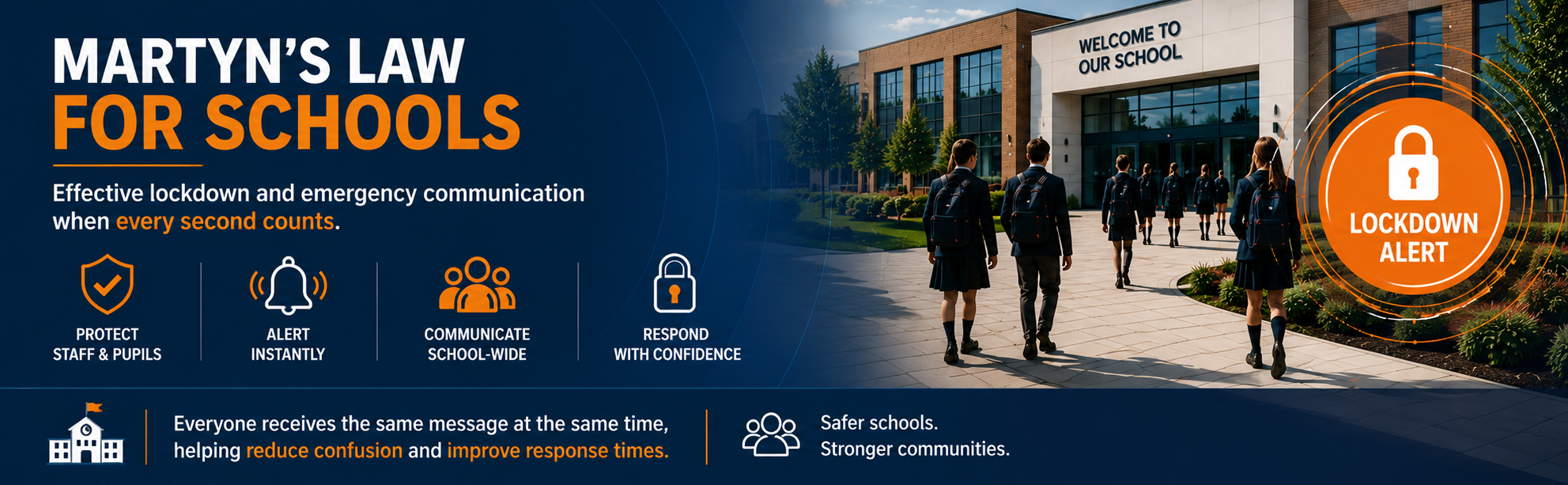
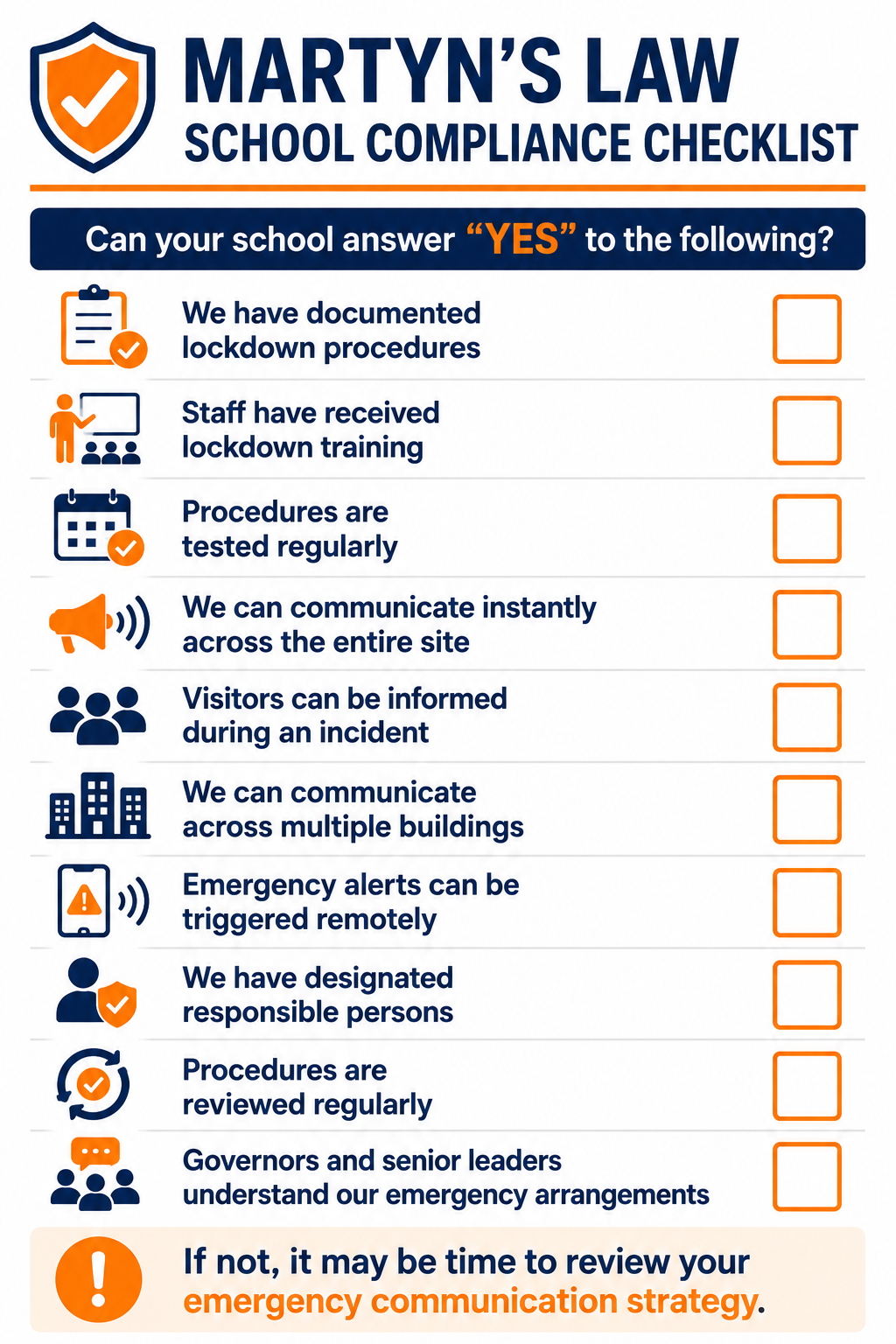
Now that Martyn’s Law has been passed, it’s more important than ever to ensure your educational setting is prepared to protect staff and pupils from the threat of terrorism. To support schools in meeting these new legal requirements, we are offering a substantial discount to help you get compliant.

What is Martyn’s Law?

Martyn’s Law, or the Terrorism (Protection of Premises) Bill, is a UK-wide measure designed to enhance the protection of larger premises against terrorist attacks. Named after Martyn Hett, a victim of the 2017 Manchester Arena attack, the law is the result of his mother’s tireless campaigning. The draft bill was published in May 2023, with final consultations ending on March 18, 2024.

The bill mandates increased protection for certain premises based on their size: Standard Tier for capacities of 100-799 individuals, and Enhanced Tier for 800 or more. Educational premises will fall under the Standard Tier, regardless of student numbers.

What is a Lockdown Procedure?

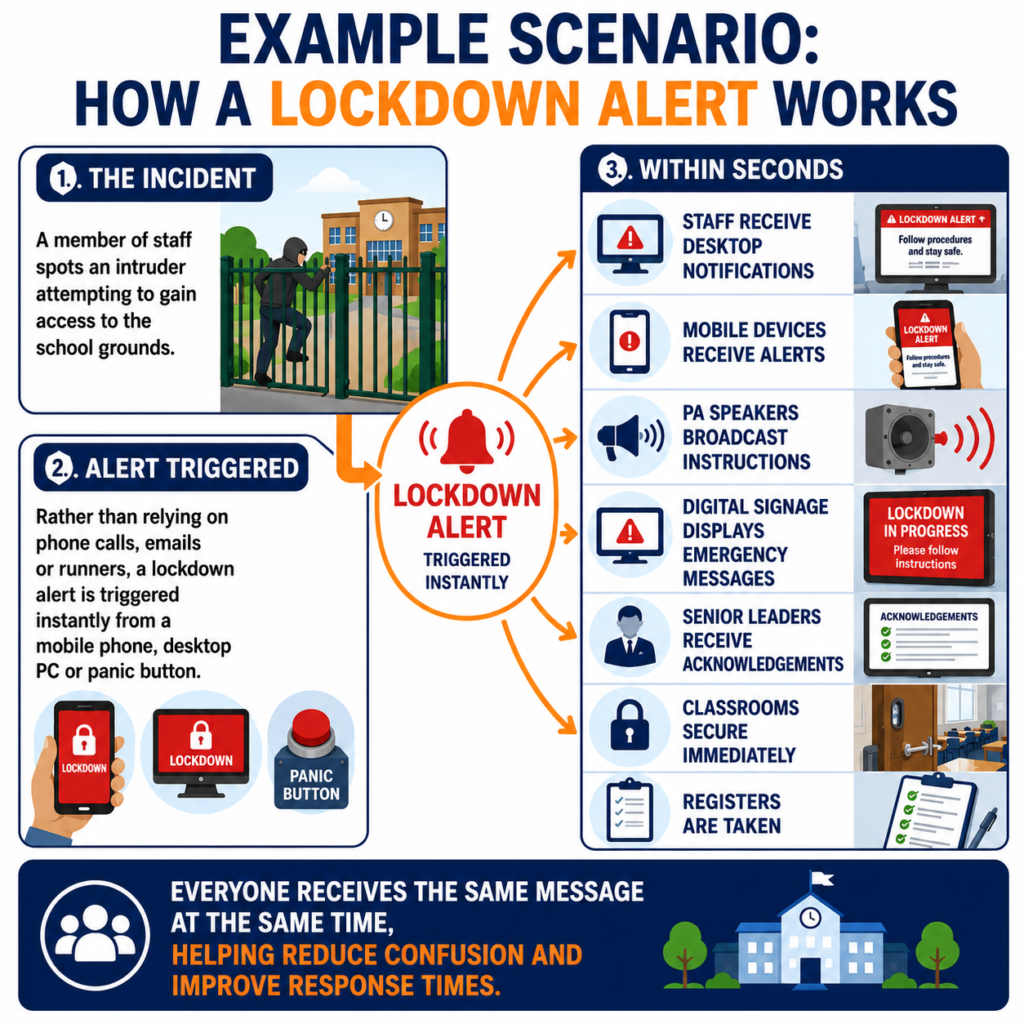
A lockdown procedure involves clear, pre-communicated actions. When an alert is triggered, all staff and pupils must move to the safest location, whether evacuating, relocating within the building, or staying put.

The alert must be broadcast throughout the premises. With Schoolwatch’s Lockdown Solutions, alerts can be triggered across multiple buildings simultaneously. The word “lockdown” or a coded message can be transmitted. Pre-recorded messages save time and reduce panic.

Not just the front desk, but members of the Senior Leadership Team (SLT) should also have trigger buttons. Alerts can be activated via a control box or remotely from a PC or smartphone. Schoolwatch offers sounders for both indoor and outdoor areas.

Lockdown procedures may be triggered by any potential threat, such as an intruder or a local disturbance. Other steps include locking doors and windows, closing blinds/curtains, turning off lights and interactive whiteboards, hiding, moving to safe areas, taking a register, and communicating with SLT, all while staying silent.

How can you prepare?

At Schoolwatch, we understand the challenges schools face under Martyn’s Law and aim to assist you in safeguarding your school through lockdown and evacuation readiness.

Effective lockdown and evacuation procedures are essential, but merely having them isn’t sufficient. Considerations include: Where is the lockdown system located? How will it be tested and communicated? Where will announcements be broadcast? How is individual accountability ensured?

Regular training and testing of procedures for staff and pupils are crucial to avoid confusion.

We recommend:

  • Providing clear instructions
  • Training all staff and pupils
  • Testing and communicating effectively
  • Informing parents about procedures and testing to reassure them of your school’s commitment to compliance with the law.

Each school should designate a responsible individual for lockdown or evacuation procedures, which may be the same person handling fire safety or another staff member.

Will this affect Ofsted inspections?

We understand that Ofsted inspectors will assess compliance with Martyn’s Law and look for effective procedures. Failure to comply may lead to an improvement notice, and ignoring it could result in serious consequences, including legal action.

Once the law is finalised, we anticipate clarity on the criteria for “Good” and “Outstanding” ratings.


How can Schoolwatch assist you?

Enhancing your premises with a Digital Alerts System is a simple way to broadcast your Lockdown alert.

Schoolwatch’s solution offers a range of features including Push Alerts, Mobile App, Desktop Alerts, Panic Buttons, PA Speakers, Digital Signage and more. 

Operating on a budget? Start with the essential requirements and expand later, leveraging your existing setup.

New to Schoolwatch? Our sales team is available to visit your site and tailor a quote to suit your lockdown solution needs.

How To Estimate The Number Of Vape Detectors Needed In Your School

How to estimate the number of detectors needed in your school

Floor to ceiling cubicles have become a vaper’s paradise. The closed-in and ventilated nature of these style cubicles means that the vapour has nowhere to escape, making this the perfect spot for students to hide. It’s no secret that a staff member can’t monitor the toilets every single second of the school day, this is where vape detectors come in.

One of the biggest issues in the fight against vaping is the number of detectors needed when you have blocks of floor to ceiling toilet cubicles. 

At one of our recent installs, the school hired a specialist contractor to remove a small section of each door to reduce the number of detectors that might be needed. This them allowed 1 detector to cover and area of 3 cubicles at once, with the detector fitted into he ceiling tile in front of the cubicles. This is just one example of how adjustments could be made to reduce the number of detectors for floor to ceiling cubicles.

The number of cubicles that the detector can cover will depend on the layout, ventilation strength and size of the gap removed to allow vapour flow. Our vape detectors have a 12ft reach in open areas, so this may be reduced with a smaller opening.

Things to consider when speaking with your contractor to make adjustments:

  • Are the toilet doors or side walls more suitable for cutting?
  • How large a gap can be made?
  • Where will the vape detector be placed?
  • How many cubicles do I want the detector to cover?

If you have any questions regarding our vape detectors, contact our team and well be happy to answer any questions you may have.

How Schools Can Maximise the Value of a Mass Notification System

How Schools Can Maximise the Value of a Mass Notification System

Increasing Campus Safety Through Mass Notification Systems

Whether at a primary, secondary or college campus, clear communication and operational procedures are necessary in any crisis, and a streamlined Mass Notification System (Digital Alerts) can deliver value in any situation.

The optimal Mass Notification System should offer:

  • Anonymous Reporting: Empowering students and staff to anonymously report suspicious behaviour or activities can stop threats from becoming something more serious.

  • Automation: The ability to pre-program templates that enable automated sending of day-to-day alerts as well as the rapid dissemination of emergency alerts to cell phones, school security, 999, email, social media, and more is crucial when every second counts.

  • Integration: The platform should seamlessly integrate with existing third-party systems and databases like social media, websites, digital signage and PA systems, allowing for streamlined communications and making it easy to reach the target audience, wherever they are, with important information.

  • Location-Based Alerting: For schools with multiple campuses — or in situations where only certain areas on a single campus need specific information — a Mass Notification System with Geo Fencing capabilities enables school leaders to send the right message, to the right people.

  • Versatility: The optimal platform should be capable of sending communications via all channels and devices — whether the message is a day-to-day notification or critical alert. Especially in an active shooter situation, where lives are on the line, a reliable, easy-to-use notification system, like Schoolwatch, can dramatically improve campus safety and security.

But a Mass Notification System isn’t just for emergency purposes. School leadership can maximise value and increase ROI by using the system for non-emergency communications.

Beyond Emergencies: How the Right System Enhances Day-to-Day School Communications

Targeted and highly relevant communications are vital in an era where employees are constantly bombarded with digital communications, both in their off-time and at work. This constant inundation can lead to a condition commonly known as “message fatigue,” where too many irrelevant messages cause employees to feel overwhelmed and can sometimes cause employees to stop reading employer-driven communications — no matter how urgent.

No two people communicate in the same way, and here’s how the Schoolwatch Mass Notification platform helps school leaders rise above the noise to ensure messages are heard loud and clear:

  • Customised Communication Channels: Send students, teachers, staff and parents’ messages in their preferred format, including landlines, email and cell phones (SMS/text, voice, TTS or push notifications via Schoolwatch’s mobile app). An unlimited number of message templates are also provided, so communications can be customised according to each school’s unique needs.

  • Staff and Teacher Communications: Create and send training updates to all employees, or individual staff members, based on pre-defined criteria. Other uses include transmitting workplace safety, and health and wellness tips.

  • Parent Communications: Update parents on weather closures and delays, unexcused absences, and notifications of upcoming events like parent-teacher conferences and fundraising events.

A Smart Use of Budget: Improving Campus Communications Today

Now, more than ever, campuses of all types and sizes need cost-effective tools that streamline communications and help community members better understand what is happening on campus.

Whether school leaders want to improve response times, and provide clear direction and real-time updates to the campus community during crisis events — or simply looking to inform their community about upcoming events, training sessions, schedule changes or workplace updates — a robust Mass Notification System is a necessary and invaluable, investment.

If you need a Mass Notification system installed at your school or campus, call us on 0845 519 3660 or fill out our contact form and we will be glad to do it.

Helping Schools with Fast and Effective Mass Notifications

Helping Schools with Fast and Effective Mass Notifications

The meaning of School Lockdown as greatly changed over the last few months, moving away from emergency situations as a whole and now focusing on COVID-19 procedures. As schools, colleges and universities reopened this late summer, there are some things we know, and much more that we don’t.

Schools across the UK closed early, long before they intended to, due to the COVID-19 pandemic. Many are now reopening, however the school day as we know it has made some dynamic changes to ensure the health and safety of students, staff and visitors.

Most schools are taking a hybrid approach: Opening to students and staff for shortened periods of time and scheduling online or distance learning throughout the premises. Some schools are keeping the students at a distance but requiring their teachers and staff report to work every day. Whatever your school decides to do as we approach back-to-school season, a solid communications strategy will help keep everyone informed and enable you to change plans quickly with as little confusion as possible.

Many, if not all, school have adopted some type of notification system to help schools inform campuses and communities about everything from general announcements to emergency situations. Schoolwatch has been at the forefront of this technology since it started being the norm. 

Danger at schools is too common, but now the risks associated with the pandemic and schools’ need to mitigate them are universal. Schools that don’t have a true mass notification platform in place can no longer push off the need. 

All college and university students, all parents of school-aged children, and all staff members from nursery through universities are going to have to stay flexible and informed at all times. Everyone involved needs to know what the protocol is for their school, and if (or when) plans change, how to respond: Masks? Online learning? Building closed? Lunchrooms? Class quarantine? There will be so much to stay updated on as this school year unfolds.

How Mass Notification Works

Schoolwatch Mass Notification (or Digital Alerts) works with schools to provide emergency and day-to-day communications to all of their community members: Staff, students and parents or guardians. Messages can be received with ease on any device, including via SMS/text, phone call, email, push notifications and even displayed on digital signage throughout school properties.

The Schoolwatch Digital Alerts system offers unlimited administrators and flexible account configuration, which also means the system can be used by anyone to reach the audiences they’re authorised to send to. Teachers can easily send fast updates to parents of students in their classes or administrators can message everyone in a school community about updated government restrictions or new policies for attending school safely.

Several examples of how mass communications can be used across your premises:

Everyday Communication

  • Information about changes in schedules and lesson planes
  • Emails regarding assignments and missed assignments
  • Links to online learning environments and instructions
  • Changes in bus or public transport information
  • Newsletters keeping the whole community informed
  • Digital signage in school reminding students to wash hands and maintain distancing
  • Enable students and staff to report to administrators if they’ve tested positive for COVID-19

Emergency Communication

  • Send last-minute text messages if class needs to be cancelled or a certain group should self-quarantine
  • Coordinate cleaning or other responses if there is an infection or outbreak at the school
  • Changes in schedules during the pandemic
  • Safety information in case of weather emergencies
  • Instructions on where students or parents can get tested for the virus
  • Panic button and Fire Alarm integration

Schoolwatch Mass Communication in Use

We’ve designed and installed many Digital Alerts and Mass Notifications systems across schools based on their requirements and needs. Here area few examples of where and why these systems were needed.

Alfred Sutton Primary School, Reading

Requirements: After an incident at the school, Alfred Sutton requested a system to trigger audio alerts as well as a method to send mass notifications at a moment’s notice.

Solution: The building was fitted with Intelligent IP Speakers which link directly to the alerting system, these can be scheduled to send message to all speakers at once or in isolated locations. After some use of this system, they have now decided to link with their neighbouring university and Maiden Erlegh school to send mass communications are share alerts across all three buildings.

New Hall School, Chelmsford

Requirements: Being a large building, New Hall requested a speaker system to cover the whole school including communication software for 100 members of staff.

Solution: Over 25+ Intelligent IP Speakers where installed across the school to ensure that all areas of the school where covered. The speakers can then be scheduled to send message to all speakers at once or in isolated locations. Digital Alerts software was also provided to provide mass notifications to all members of staff and students.

Bournemouth and Poole College, Poole

Requirements: The college requested software for 750 users that can send clear messages to both staff and students across 5 campuses.

Solution: The Digital Alerts Mass Notification system was installed to send pop-ups, push notifications, emails and alerts immediately, across all five campuses. All updates and alerts could be sent to all staff and students at a moment’s notice or scheduled for regular updates.

If you need to have a Mass Notification system installed at your school or campus, call us on 0845 519 3660 or fill out our contact form and we will be glad to do it.

101 CCTV questions, answered! What didn’t you know about CCTV?

101 CCTV questions, answered! What didn't you know about CCTV?

  1. What does CCTV stand for?

CCTV stands for Closed-Circuit Television.

This is a closed-circuit system because the signal is not openly transmitted as it is with broadcast television. The video cameras transmit the footage back to a set number of monitors.

  1. What is CCTV?

CCTV is a video system in which specifically placed cameras record video images and transmit these to a monitor/monitors, with only a small number of people being able to access it.

  1. What is CCTV used for?

In terms of security, CCTV can be used to monitor both public and property security. CCTV systems are primarily used for security, monitoring and surveillance purposes. For monitoring and surveillance purposes, CCTV can be used to for investigation or crime prevention.

  1. Is CCTV legal?

CCTV is legal when it complies with guidelines set out by the law.

According to the government, if your business requires CCTV, people must be told that they are being recorded. If you own the home property, you do not require permission to install CCTV, but do need to alert neighbours. If you do not own the property, you will have to speak to the landlord.

  1. Do I need a CCTV Licence?

You must get a license from the Security Industry Authority (SIA) if you work as an operative (or supply operatives under a contract for services) who uses closed circuit television (CCTV) equipment to:

  • monitor the activities of a member of the public in a public or private place
  • identify a particular person

  1. How much is a CCTV Licence?

The application for a SIA licence can be found here.

  1. Why is it important to have CCTV?

CCTV is important because it can deter crime, it can be used as evidence, and therefore acts as a force of law enforcement, it can monitor employers, and encourage greater work productivity.

It can also lower costs by preventing burglary and it can be used for the safety of others; e.g helping track lost people, monitoring workers operating in dangerous conditions.

  1. How do CCTV systems work?

A CCTV system consists of a camera, lens, monitor and recorder. The camera/cameras pick up the images, which are then transmitted then to a recording device and then a monitor.

  1. What are the types of CCTV cameras?
  • Dome CCTV Camera 
  • Bullet CCTV Camera
  • Infrared/Night Vision CCTV
  • Network/IP CCTV
  • Wireless CCTV Camera
  • High-Definition HD CCTV
  • Thermal Heat detection CCTV cameras

  1. Who invented CCTV?

Walter Bruch invented the first CCTV in 1942 during WW2 in Germany. The purpose of the CCTV was to monitor the V-2 rockets. CCTV technology became a commercial product from 1949 onwards.

  1. Do CCTV cameras need planning permission?

You do not require planning permission, unless you are installing CCTV in a listed building or conservation area.

  1. Are CCTV images personal data?

Yes. The Information Commissioner’s Office (ICO) sate that CCTV cameras can only be used when it is a necessity and should be ‘proportionate response to a real and pressing problem.”

  1. Can CCTV be used to monitor staff?

The Data Protection Act (DPA) does not state that employers are not allowed to monitor employees with CCTV. However, staff must be alerted to the fact that they are being recorded.

  1. How many days can CCTV record?

This would depend on the type of camera and storage specified

  1. How many hours of video is 500 GB?

This will depend on the image rate and size of the video files but on a low setting you could expect 18 days

  1. Can you ask to see CCTV footage?

This is covered under the data protection act of 1998, it will only apply to businesses and organisations and not domestic homes.
https://www.gov.uk/request-cctv-footage-of-yourself

  1. Do security cameras use a lot of electricity?

Security cameras use on average between 4 to 6 watts a day.

  1. Does CCTV work without electricity?

CCTV cameras rely on a power supply, therefore no. Unless it is a battery-operated CCTV camera.

  1. Can CCTV work without Internet?

Yes, providing that the CCTV camera has a means of transmitting a signal to the DVR or NVR, it can work without an internet connection.

  1. What is IR in CCTV camera?

Infrared (IR) cameras detect heat (infrared energy). This is converted into an electrical signal which then produces a thermal image. Infrared light is emitted from the IR LEDs which are positioned around then lens of the camera.

  1. What is an IR bullet camera?

An Infrared bullet camera with inbuilt infrared lights.

  1. What are IP cameras?

An Internet protocol camera is a digital video camera that sends and receives data via a computer network. This differs from a CCTV camera, which can only send and receive signals through a cable connected to a DVR.

  1. How much does it cost to have CCTV installed?

This varies according to the number of CCTV units installed, and the type of CCTV installed. Please contact us if you would like to discuss this further.

  1. How much does home CCTV cost?

It all depends on the size of the buliding and number of cameras. we would always recommend a full site survey.

  1. How much does it cost to run a security camera?

Depending on system type and number of cameras it can vary based on domestic or very large commercial systems.

  1. Does CCTV camera need power supply?

Yes, all CCTV cameras require a power supply. CCTV systems are normally powered by a power box or power adaptor. IP Cameras are normally power over Ethernet (PoE) technology using Cat5 or Cat6 cables.

  1. How does CCTV camera work?

A sequence of images is picked up on by the camera, which is transmitted as a signal that passes on to recording device and display device. The camera itself captures the video source. At the front of the camera is an opened aperture, and this is what captures the light stream through the lens. The light stream is captured by a digital chip inside the camera and turned into a sequence of images. This camera records this sequence of image and transmits either by cable or wirelessly.

  1. Do I need a CCTV sign?

If you have a CCTV installed at commercial property or public building, you are required to install appropriate signage. Data protection rules do not apply if you install a camera on your own home to protect it from burglary.

  1. Do CCTV cameras record audio?

Most CCTV cameras do not record audio, but some have the ability too. Please contact us regarding improved audio for CCTV cameras.

  1. Is it illegal to record sound on CCTV?

It is not illegal to record CCTV sound as long as all guidelines are followed within commercial and public buildings, in some cases it may be unnecessary to use sound recording at all.

  1. Is CCTV footage personal data?

CCTV is personal data according to General Data Protection Regulations (GDPR), and therefore those installing it must give a sound reason for having it installed.

  1. How long does it take to install security cameras?

This depends on the number of cameras you would like to have installed. The location and accessibility to them. We always recommend a full site survey be undertaken before an install.

  1. Do all security cameras need wifi?

No. not all security systems need WIFI. Most are directly cabled.

  1. Do wireless security cameras slow down internet?

Yes, wireless cameras can slow down a network but not significantly.

  1. Do wireless security cameras need to be plugged in?

Wireless cameras are no different to wired cameras, they still need to be plugged into an electrical outlet.

  1. What is Pan in CCTV camera?

Pan is the physical movement of the camera from side to side. Short for panning.

  1. What is camera PTZ?

A pan-tilt-zoom camera, which allows the camera to be remotely controlled to move or zoom in.

  1. What is DVR in CCTV?

DVR is short for digital video recorder, which is where video footage from the CCTV is stored.

  1. What does a DVR do?

The DVR is the computer that saves footage onto the hard drive, USB drive, SD memory card or SSD.

  1. Can a DVR work without a hard drive?

A CCTV system can continue to work, but playback will not be possible.

  1. Can we connect DVR with WIFI?

There are lots of ways to connect your recording device to either Wifi or the internet, each method will depend largely on the recording device you have.

  1. What is an NVR recorder?

A Network Video Recorder records video in digital format. Unlike a DVR, the input if from a network instead of a video capture card. Video is encoded and processed at the camera, and then streamed to the NVR.

  1. Does NVR require Internet?

NVR can work without internet.

  1. What is better NVR or DVR?

A Network Video Recorder records IP cameras whilst an Digital Video Recorder are known for recording analogue video from coax cameras. The image quality is normally higher on the IP cameras.

  1. How much does it cost to buy a DVR?

This all depends on how many cameras you will have connected and how long you wish to record for.

  1. Can CCTV footage be used in a disciplinary?

Yes

  1. Can surveillance cameras be used in court?

Certain essentials in the law of evidence must always be considered when utilizing digital video images.

  1. How can I connect my CCTV to my smartphone?

There are many approved manufacturer APPs that allow you to view your CCTV footage on portable devices

  1. How many CCTV cameras are there in the UK?

 The British Security Industry Association (BSIA) estimated there to be 4-5.8 million cameras in 2015.

  1. What voltage are CCTV cameras?

Generally, CCTV cameras are low voltage often 12 – 24 volt.

  1. What is the work of CCTV operator?

A CCTV operator is responsible for watching the monitors linked to the surveillance cameras installed around the premises. Their duty is to watch out for and report suspicious behaviour from and recorded footage.

  1. How long does CCTV footage last?

This depends on how long the company chooses to keep the footage.
If the footage is being used in a criminal case it may be archived indefinitely.

  1. Can you ask to see CCTV footage?

Yes, you can. Find out more by visiting the government website.

  1. Can you put CCTV in the workplace?

Yes, providing the employees are aware of it. There is no law which states that surveillance cannot be used within the workplace.

  1. Does an IP camera work without Internet?

Yes, it can be directly connect to a recording device without any internet connection.

  1. What country has the most CCTV cameras?

It is generally believed to be the UK. With 1% of the worlds population but 20% of it CCTV Cameras.

  1. How many days can CCTV record?

This depends on the storage capacity of the DVR/NVR, which is the choice of the purchaser.

  1. How can I access my CCTV on mobile?

There are many approved manufacturer APPs that allow you to view your CCTV footage on portable devices.

  1. Do you need WIFI for security cameras?

No

  1. Which CCTV camera is best?

This depends on the purpose of the CCTV.

  1. What is the best brand for security cameras?

There are many good quality CCTV manufactures with exceptional products.

  1. Does CCTV work in darkness?

CCTV with night time capabilities can. These cameras can pick up infrared light and convert this into an image.

  1. What is difference between IP camera and CCTV camera?

The main difference is the way the signal is sent Analogue systems turn the signal into a format a Video recorder or tv screen can receive. The IP camera digitises the signal and sends it out via packets over a network connection.

  1. Are IP cameras better than analogue?

IP Cameras offer superior video quality, video analytic features and scalability.

  1. What is the difference between analog and IP cameras?

The main difference is that the IP camera will have more features and a higher image quality than the IP camera.

  1. Is CCTV analogue or digital?

It all depends on the type of camera installed.

  1. What is AHD in CCTV?

Analogue High Definition which uses a coax cable to transmit HD video footage from CCTV to DVRs. It supports 720P AND 1080p HD video resolutions.

  1. Is 960h or 720p better?

 720p

  1. Is 720p or 1080p better?

 1080p

  1. How do I connect my CCTV to the Internet?

First assign the DVR an IP address, and then connect it to the Local Area network (LAN). Set up port forwarding on your router, then set up a static DHCP Ip address for the DVR. Configure a dynamic DNS account, set up a dynamic dns on your router, then set up remote internet connection.
Some newer systems are equipped with P2P that only requires the scanning of a QR code to connect to the system.

  1. Can we connect DVR with WIFI?

Some DVR’s have built in WIFI some do not. You would need to check your specific model.

  1. Do wireless security cameras need Internet?

No, they only need to be connected to a power supply.

  1. How do I connect my DVR box to my TV?

There are several ways in which this can be done.
A DVR box can be connected to a TV set by a HDMI Cable, DVI Cable, component cables and s-video cable.
Methods:

HDMI – Turn off TV and DVR. Connect the DMI cable to HDMI out port of the DVR Box. Turn on DVR and TV, and these will no be connected. On the TV screen you should have option to select HDMI.

DVI Cable – Turn of TV and DRVR. Plug in the DVI end of HDMI-to-DVI cable the DVI port at the side or back of your TV. Connect the audio cables to the TV and the DVR. Switch on TV and DRVR, and select “HDMI 1” as input source.

Component Cables – ensure TV and DVR are turned off. Connect the component cable’s green, blue and red connectors into the matching ports of the TV. Connect the other colour coded component cable’s connectors into the DVRs matching out ports. Next step – connect the audio cable into the TV using an audio cable. Plug the other end of the audio cable into the DVR. Switch on the TV and DVR and select HDMI 1 as an option.

S-Video Cable – turn off TV and DVR. Connect S-video cable to TV into the S-video in port, then connect the other end of cable into the S-video out port on the back of DVR. Next step – connect the audio cable to the TV and then attach the other end of audio cable into the DVR. Select HDMI 1.

  1. What does TVI mean in CCTV?

TVI allows for the transition of high quality video footage over traditional cabling (Cat5, Cat5, RG59, UTP).

  1. What is CVI in CCTV?

High Definition Composite Video Interface.

  1. What is TVI?

TVI stands for Transport video interface

  1. What is CVBS in CCTV?

CVBS stands for Composite Video Blanking and Sync, which is the traditional analogue signal delivered to the DVR.

  1. What is RCA cable?

An RCA connector carries audio and video signals.

  1. Is RCA analogue or digital?

Analogue

  1. What is CVBS video output?

CVBS stands for Composite Video Blanking Sync. Often referred to as SD Video or standard definition.

  1. What is HD camera?

A high definition camera

  1. What is Hdtvi?

High Definition transport video Interface.

  1. How can I watch CCTV Online on Android

There are many APPS available and your NVR/DVR instructions will explain the best one to use or even give you a link to their own APP.
This is simply installed and then configured as per the manufacturer’s instructions.

  1. What is an SDI signal?

Serial Digital Interface is the standard for digital video transmission over coaxial cable.

  1. What is camera PTZ?

Pan tilt and zoom. The ability of the camera to move around and zoom in and out.

  1. What does Cvbs stand for?

Composite Video Blanking and Sync often simply referred to as SD (standard definition).

  1. What is AHD Camera?

Analogue High Definition.

  1. What is the difference between AHD camera and HD camera?

AHD Cameras use coax cable for the transmission of HD videos to DVRs.

  1. What is CVI camera?

High Definition Composite Video Interface. This technology allows for a higher resolution.

  1. What is a SDI camera?

An HD-SDI camera captures 1080p resolution (1920 x 1080) video footage.

  1. How do I choose a CCTV camera?
  • Cheap is expensive.
  • Check the warranty. 
  • Understand basic camera capabilities. 
  • Clarify camera type. 
  • Comparing Analogue, HD or IP cameras. 
  • Decide what you want the camera to see. 
  • Select the best camera position. 
  • Consider need for support lighting.

  1. What is focal length in CCTV camera?

Focal length is expressed in millimetres and is the distance of the lens from the image sensor. The smaller the number the wider the field of view will be. A zoom lens will have 2 numbers a lower number and an upper number.

  1. How far can you run security camera cable?

This depends on the camera cable you choose. Huge distances can be covered by Fibre transmission.

  1. How long does a company have to keep CCTV?

31 days is still recommended by the police. But in reality, you should make your own decision on retention times.

  1. What kind of cable is used for CCTV?

Coaxial cable for analogue and HDCVI. Cat5 and Cat6 for IP systems.

  1. Which cable is best for CCTV camera?

Not all coaxial cable should be used for CCTV camera installations. RG59 coax cable is the industry standard and best choice for CCTV systems and HD over coax systems. But more commonly Cat5 and Cat6 is now used for IP cameras. If you are unsure of which cable is needed, please contact us here.

  1. Can I use cat5 cable for CCTV?

Yes, this can be used to connect cameras for both IP systems and analogue.

  1. What is the maximum length for coaxial cable for CCTV?

An RG59 coax ca can run up to 600 feet other larger cables can run longer distances.

  1. Which is better rg59 or rg6?

RG6 can be run a longer distance without video loss.
RG59 is a thinner cable in comparison, and easier to work with.

  1. How long can CCTV footage be kept?

31 days is recommended still by the police.

  1. Do pubs have to have CCTV by law?

No, the new Code states:

“1.15 When a relevant authority has licensing functions and considers the use of surveillance camera systems as part of the conditions attached to a licence or certificate, it must in particular have regard to guiding principle one in this code. Any proposed imposition of a blanket requirement to attach surveillance camera conditions as part of the conditions attached to a licence or certificate is likely to give rise to concerns about the proportionality of such an approach and will require an appropriately strong justification and must be kept under regular review. Applications in relation to licensed premises must take into account the circumstances surrounding that application and whether a requirement to have a surveillance camera system is appropriate in that particular case. For example, it is unlikely that a trouble-free community pub would present a pressing need such that a surveillance camera condition would be justified. In such circumstances where a licence or certificate is granted subject to surveillance camera system conditions, the consideration of all other guiding principles in this code is a matter for the licensee as the system operator.” Read the document here.

If you need to have an access control system installed at your school or campus, call us on 0845 519 3660 or fill out our contact form and we will be glad to do it.

Access Control in Schools, what are the benefits?

Access Control in Schools, what are the benefits?

Everyone wants to keep their schools secure; this is the top priority for an access control system. Unless yours is an office comprised of less than 10 employees where you might be fine with locks, it is wise to install an access control system on your business premises.

Such a system will curb any security threats, giving you peace of mind. It is common to find an area in any schools that needs to be restricted from the public.

There are other many non-commercial facilities that have embraced this access control technology, including hospitals, universities, country clubs, government buildings, apartments, and municipal buildings, just to mention a few. These organisations understand that it is particularly important to keep the public from roaming freely in their facilities. Such a system will help determine who has permission to go where within the organisation, unlike in the case of traditional keys and locks.

There’s much more to Access Control than just increased security, including:

Restriction to certain areas

There is no school that gives its employees and students full access to all areas of the building. For example, the reception stores every employee’s sensitive information and documents that are not supposed to be made public for all staff members to access. With access control keycards or finger scanners, the organisation can control who has access to that specific office.

Duplication is difficult

Anyone with bad intentions can easily duplicate a physical key and use it to gain access to your premises since it is not costly to acquire one. This will mean that you will be forced to change locks. For how long can you keep up with that trend? It would be easier to get an access control system as if a key is lost; all that is needed is changing the codes and cancelling access of any lost keycard.

More than just opening doors

Access control can be used with more than just opening doors. You can use such technology to open barriers, turnstiles, motorised fences, and parking gates. This will keep any intruders away from your school, making the environment safer for everyone. 

Protection of valuables

If you have any valuables in your business that can fetch easy and quick money if stolen, you will need to ensure it is securely stored in the office or classroom. In case one of your employees decides to use their keycard for the wrong reason and steal these valuables, you will be in a position to know who exactly did that as these systems can be managed from any computer that is connected to your network. However, with a traditional key, it will be extremely hard to know who committed the theft.

Multi-location access

For schools with multiple locations or campuses, access control systems will make it easy for all the students and employees to traverse from one building to the other or place to place without any problems. This is a better solution than having multiple physical keys for different building for every employee.

Investment: Save energy and cost

Another great thing about access control systems is that they can be integrated with any other systems in your building like the HVAC system. The most sophisticated of these systems will be able to tell you the specific areas of the building need to be lit, heated or cooled at any specific moment. This will help save on energy costs since you will avoid heating or cooling any room that doesn’t need to be.

Simplify employee turnover

For most campuses, and complexes have the capacity to easily restrict access to a single keycard or even replace a lost one without going the hassle of replacing keys to every individual accessing the building.

Recorded history of entry

Apart from being able to revoke any privileges that come with your employees’ or students’ keycard, access control systems also record and store information regarding everyone who comes into the building. As soon as an employee or student scans their card, the system is prompted to record the time, location and details of the person who accessed the building. This will help the management in two ways. Firstly, you will be able to know if your employees get to work at the company’s stipulated time or they are always late and whether they leave at the right time. Secondly, it will be easy to identify who had access to the building at what time in case you realise there was a case of burglary or vandalism. This will help you get hold of the culprit.

If you need to have an access control system installed at your school or campus, call us on 0845 519 3660 or fill out our contact form and we will be glad to do it.